Who Holds the Switch
Weaving Intelligence (House AI Style), with Jeff Shabel’s Experiential Commentary
A governance council approves a policy about master data. Every supplier record must carry a tax identifier. Country codes must come from the approved list. A ship-to address must sit in the same country as its account. Only the procurement data team may change payment terms. The minute that records the approval says the policy is in force. The question I was asked this week is what that means inside Profisee the next morning: which of those policies can the platform actually enforce, so that a record that breaks one is stopped or held before anyone uses it, and which can it only flag, score or report after the fact?
I should say first what this article does not do: it does not look ahead. I know some of Profisee's plans for the next few years, and I will not pre-empt the vendor's own announcements, so what follows is Profisee as it ships today.
A disclosure, because what follows assesses Profisee. The practice behind this publication is a Profisee partner: clients pay us for deployment work, a licence sale we refer earns us a referral fee, our services revenue depends on master data management being bought at all, and we may offer the tooling we build to Profisee itself. Those interests run toward praise of Profisee and of the category, so weigh what I say in their favour below what I say against them. One runs the other way: we build our own tooling to integrate Profisee with enterprise systems, which gives us a reason to say the product does less on its own than it does. Discount that judgement too. The other products named below are cited for what their own documentation says they do; none is assessed.
My answer to the present-tense question came in levels:
There are a number of different levels of ‘enforcement’ within Profisee:
· Data types are strongly enforced. Text has a length limit that can be set and enforced, Numeric data is also strictly enforced.
· Reference data is (mostly) strongly enforced. Direct imports through inserts and loads, by default, restrict data insertions into reference fields to values that are already present. That said, most import methods supported by Profisee also allow the opportunity to ‘auto-insert’ those values in the reference tables as part of the data load.
· Business Rules can apply ‘validation’ checks to data using reasonably complicated formulae. When records are flagged as ‘invalid,’ what can be done with them is systemically restricted.
That is three levels, and the order matters: the platform is strictest about the shape of a value, a little less strict about whether a value is on an approved list, and least strict, in the default case, about whether a record passes a business rule. I want to walk through each, because each comes with something my short answer only hinted at. Every level has a switch beside it. Data types are set in the model. The list can be opened during a load. A rule can be made to refuse rather than flag, and a flag can be made to stop things downstream. A council that approves a policy is approving the outcome; whether the outcome happens depends on how those switches are set, in which environment, and by whom. That is the article's argument, and the rest of it is the evidence, mine and the documentation's, for each level in turn.
Stop, hold, flag
Auditors had names for this distinction long before master data management did. Syracuse University's internal audit office puts the standard definitions plainly: "Preventive controls are proactive in that they attempt to deter or prevent undesirable events from occurring," while "Detective controls provide evidence that an error or irregularity has occurred" [1]. The same page states the usual preference and its limit in one sentence: "While preventive controls are preferred, detective controls are still critical" to show that the preventive ones are working [1].
In the vocabulary of this article, a preventive control either stops a record or holds it. A stop means the change never saves: the value is refused at the door. A hold means the record exists but goes nowhere, for instance a row left in a staging table because one of its values failed a check. A detective control flags: the record is saved and used, carrying a mark that says something is wrong with it, and somebody has to act on the mark. There is a fourth answer, which is "not here at all": the policy is enforced somewhere else, before the record ever reaches Profisee. I will use those four words, stops, holds, flags and outside, throughout, and the map at the end of the article sorts the council's four example policies into them, and its figure does the same for six kinds of policy.
The audit page's last point is the one I will come back to. A detective control is not only a weaker substitute for a preventive one; it is also how you find out whether the preventive one is still switched on.
Level one: the shape of a value
The first level is the one nobody argues about. Profisee's documentation describes each free-form attribute as having a data type, chosen from "Text, Number, DateTime, Date, or Link," and a length: "Set the maximum length (in characters) for this attribute" [2]. A value that is not a number does not go into a number attribute, and a code that is too long does not go into a text attribute with a shorter limit. In my answer's words, these are strongly enforced. They stop.
Two things belong at this level that my answer did not mention, and both come from the documentation. An attribute can be marked so that its "value must be unique across the set of values in the entity," and the platform will not let you switch that on over data that is already dirty: "the creation of the constraint fails if the existing data in the attribute is not already unique," so "you must first cleanse the data" [3]. And a free-form attribute can be marked Restricted, which, in the documentation's words, "essentially makes an attribute read-only to all users"; it "only allows processes, business rules, API, and other system processes to change or add values for the attribute" [2]. Uniqueness and read-only are stops too.
The limit of this level is that it governs the shape of a value and nothing about its meaning. A supplier's tax identifier stored in a twenty-character text attribute will be refused if it is twenty-one characters long. It will not be refused for being somebody else's tax identifier, or a string of zeros, or a placeholder a clerk typed to get past a required field. The council's policy was about tax identifiers. Level one enforces the length of a field.
The switch at this level is the model itself. Data type, length, uniqueness and the Restricted flag are settings on the attribute, changed by whoever changes the model. In the councils I have described before, that is the Data Governance Group building in a lower environment and the enterprise's release process carrying the change upward (The Council Signs, the Release Ships), and I have written separately that versioning and source control are not integrated into Profisee itself (Simple Is a Trade). For level one, then, the switch is held well: the people who hold it are the people the council already oversees, and, in the councils I have described, moving it normally takes a release.
Level two: the list, and the door in it
The second level is where the council's "approved list of country codes" lives. In Profisee an attribute whose values must come from a list is a domain-based attribute, a DBA in the documentation: "an attribute with values that are populated by records from another entity" [2]. The list is that other entity, and in my answer, a load can only put into the attribute values that are already in it. That is a hold: a record carrying an unknown country code does not get its value in.
The documentation shows the hold at work in the staging tables, the bulk-load interface. Every row in a merge staging table carries a column that "identifies if DBA record values included in the staging table are valid" [4]. A staged value that is not in the domain entity marks the row invalid, and the documentation's own example of when that happens is "if the domain value does not exist and the option to ‘Add Domain Values’ does not exist on the merge staging table" [4]. The rule is stated flatly further down: a row fails when "Any non-NULL DBA attributes specified in the merge table cannot be found in the associated domain entity if the Add Domain Values option is not specified" [4].
That conditional is the door in the list, and it is the "(mostly)" in my answer. Most of the ways data gets into Profisee can be told to add an unknown value to the list instead of refusing it. In my experience Connect, Profisee's integration engine, carries it as a strategy flag called Automatically Add DBA Value; the staging tables carry it as Add Domain Values [4], and the staging FAQ's answer on permissions speaks of an Auto-Add DBA option [5], which I read as the same door. With the door open, the unknown country code arrives, a new member appears in the list of approved country codes, and the record is valid against a list that has just been changed by a load. Nobody approved the new country. The council's list grew by itself.
So the obvious question was who opens the door, and I was asked it directly:
Auto-insert is turned on by whoever set up the import template in Connect or the other import interfaces--either on a per-execution basis, or in a configuration template that is regularly executed. In production environments, it's usually off. In development or test environments, it's usually on during testing/initial build. Those decisions are usually the Data Governance group for the Production environment and the Developers in the Dev environment.
The question supposed that auto-insert might be a developer's convenience nobody in governance had decided, which would make an approved list leak at load time without anyone approving the leak. In my experience it is the reverse in the place it matters: in production the door is usually shut, and the governance group is usually the one who shut it. In development and test it is usually open, presumably because a model under construction needs data in it and nobody wants every load to stop on a missing reference value. Both of those choices are reasonable. Note the word "usually," three times; I am describing what I have seen, not a law of the product.
What the answer does show is where the switch physically lives: in the import configuration, either chosen for one run or saved in a configuration template "that is regularly executed." That makes it configuration in the ordinary engineering sense, and engineering has a well-known definition of the word. The Twelve-Factor App, a widely used set of principles for building software services, defines configuration as "everything that is likely to vary between deploys (staging, production, developer environments, etc)," and notes that "Config varies substantially across deploys, code does not" [6]. A switch that is open in development and shut in production is configuration by that definition, and it carries the risk that comes with configuration: what is promoted from one environment to the next is not always what anyone checked. A template built in development, with the door open because that is how development works, has to have the flag changed on its way to production by someone who knows the flag is there. My answer says governance usually decides it in production. My reading, not a claim about any programme I have seen, is that "usually decides" should become "decides and can show it": the flag on every production template should be a thing somebody can list.
The documentation adds a second key to the door that my answer did not mention. Auto-adding a value means creating a member in the list's entity, so the account that runs the load needs that right: "If Auto-Add DBA is specified, that user must also have create permissions on the domain entities" [5]. The FAQ documents that requirement for staging run from FastApp Studio and does not repeat it for the other routes into Profisee; which account a load runs as is a question I come back to below. Either way, it is worth asking which account runs your production loads and what it may create.
Profisee is not unusual in shipping load-time enforcement as a switch. Microsoft's documentation for SQL Server's BULK INSERT command says that without an explicit option "any CHECK and FOREIGN KEY constraints are ignored, and after the operation, the constraint on the table is marked as not-trusted," and it lists rows that violate constraints as "A situation in which you might want constraints disabled (the default behavior)" [7]. A database engine that enforces its constraints on every ordinary insert ships its bulk loader with its CHECK and FOREIGN KEY constraints off. Loads are where systems trade enforcement for throughput, and the trade is always a setting somebody chose.
Level three: the flag, and what makes it a hold
The third level is where most of the council's policies end up, because most governance policies are rules about relationships between values, not about single values: the ship-to address must be in the account's country; a supplier marked as a sole trader must not carry a company registration number; an end date must follow a start date. In Profisee those are business rules, which Profisee's documentation now calls data quality rules, and my answer's third bullet describes what they do: the record is flagged invalid, and what can be done with it is then restricted.
The documentation frames the default the same way. Data quality rules exist to "evaluate golden record data and flag attribute values in golden record data entities as either passing or failing" [8]. The record is saved; the flag travels with it. That is a detective control, and a flag is only as good as the attention paid to it. I have written about what happens to the flags when nobody owns the queue they land in (The Queue Nobody Worked), and I will not repeat it here.
Two details in the documentation matter to a council that has just approved a rule. The first is timing. Rules "are active when created, but will only be used to evaluate data that changes after the rule is created" [8]. When a rule is added or changed, "rules are not run immediately and must be explicitly requested to run in order to re-evaluate the entity against the new or updated rules" [9]. A council that approves a new rule on Tuesday, released on Thursday, has a rule that judges each record as it is created or changed from Thursday on, and leaves the records nobody has touched since unjudged until someone runs it over the entity. Running it is a switch too, and it is easy to forget because nothing breaks if you do.
The second detail is the one that changes the shape of my answer, and it comes from the documentation, not from me. A validation clause can be marked as a constraint: "Constraint rules prevent users from creating or updating a record that violates that rule," and the documentation's example is that if "Name is required" is marked as a constraint, "a user cannot create a new record with a blank Name attribute" [10]. That turns a flag into a stop. It is a per-clause choice made by an administrator (the documentation gives rule management to Super Administrators in FastApps Studio [8] and rule creation to Profisee Administrators in the Portal [11]), and the staging tables have a matching choice at load time, set by whoever manages the staging table, a Super Administrator or Batch Integration Administrator [12]: an option to "Enforce data quality constraint rules," which "is disabled by default"; when it is set, "Any members which violate constraint rules are skipped" and left behind in the staging table [13]. The same configuration screen carries a third choice, whether to "Process valid records when invalid records are present," which lets the rest of a batch through and leaves the invalid rows behind [13].
So level three is not one level. It is a flag by default, a stop for a clause someone marks, and a hold at load only if a second someone turns the load option on, which by default they have not.
There is one more way a flag becomes a hold. After I had answered, I added this:
Logic can be written based upon the validation status of the record, which can trigger other elements within Profisee and also in other systems, since it's an attribute of every record of every Entity.
Logic on the status is part of almost every flow I build, because the status tells the flow something important about the record. The validation status is data. The documentation shows it returned on every member, per attribute, to anything that reads the record through the API or a workflow, as one of "Unknown," "ValidationSucceeded" or "ValidationFailed" [14]. So the hold need not live in the rule at all. A downstream system can refuse to pick up a supplier whose status is failed; a workflow can route a failed record to a steward before it is published; an extract can leave failed records out. Each of those turns a detective control into a preventive one, at a place of somebody's choosing, and each is a switch held by whoever wrote the logic. My reading of that is the same as for the load flags: the logic that makes a flag into a hold is governance, wherever it lives, and a council that relies on it should know where it is.
That leaves the question my answer did not settle: what, exactly, is restricted for a record that fails an ordinary rule. I said it is systemically restricted. Profisee's page on creating rules documents two related mechanisms rather than a list: the Constraint checkbox, which "prevents users from creating or updating a record that violates that rule," so the record is never saved, and logic written on the validation status, down to a worked example that copies a parent record's status into an attribute so that a child entity's rule can test it [11]. Neither is a list of what is restricted for a saved record that fails an ordinary rule, and none of the pages I read gives one. If your council's policy depends on that list, ask for a demonstration in your own environment.
Other products make the same choice in different places, which is itself evidence that the choice is a design decision rather than a law of master data. Microsoft's Master Data Services lets a value that fails a business rule be saved ("the value can still be saved") but will not let a version be committed until "all attributes pass business rule validation" [15]: a flag at entry and a stop at a later gate. Semarchy's documentation describes validations that run before records are consolidated, which "remove erroneous source records from the certification process," and validations that run after, which "only flag erroneous golden records" [16]: a hold or a flag, depending on where the rule is placed. Outside master data, Databricks' pipeline expectations default to writing invalid records through ("Retaining invalid records is the default behavior for expectations"), with a fail setting under which "Invalid records prevent the update from succeeding" [17], while dbt's tests default the other way, with severity "error or warn (default: error)" [18]. Two widely used tools, opposite defaults. In each case somebody picked the default, and somebody on your team can change it.
Who may change what
The fourth of the council's example policies, that only the procurement data team may change payment terms, was in the question and not in my answer, so what follows is the documentation's account with my reading labelled.
Profisee enforces permissions at two grains. "Assign data permissions to accounts at the entity and attribute level -- the columns of the database table. Use filter permissions to control data members at the row level" [19]. An update filter "Limits the members an account can create, change and delete based on the filter criteria," and the documentation's own example ends with a steward who can maintain blue bicycles and cannot add a yellow one: "Accounts cannot create members which their permissions prevent them from accessing" [19]. For a change made by a person, that is a stop, and of the four kinds of policy it is, as I read it, the one Profisee enforces most directly. In my experience a load runs as a Profisee user account, or on a token tied to one, and that account's permissions apply to it. The documentation adds one route where they do not: the staging procedure can also be run by "a non-Profisee user assigned the stg_exec database or dbo* role," and a Profisee user is required only when the staging table enforces data quality constraint rules [20]. A load run directly on SQL by such an account answers to its database role, not to a Profisee team, so for payment terms the question is also which account runs your production loads.
The switch is the permission assignment, and the documentation states how assignments combine. When an account's access is affected by more than one filter on the same entity, the filters "are combined using a logical OR operation," and "Broader permissions always take precedence over more restrictive permissions" [19]. My reading of that, for a council: a restriction holds only as long as nobody who should be restricted is also a member of a team that is not. Adding a person to a second team, for an unrelated reason, can quietly widen what they may change. Assigning permissions requires "The Permissions Administrator role" [19], so that role holds the switch for this kind of policy, and the useful detective control is a periodic look at who can, in effect, change payment terms, not at who was meant to.
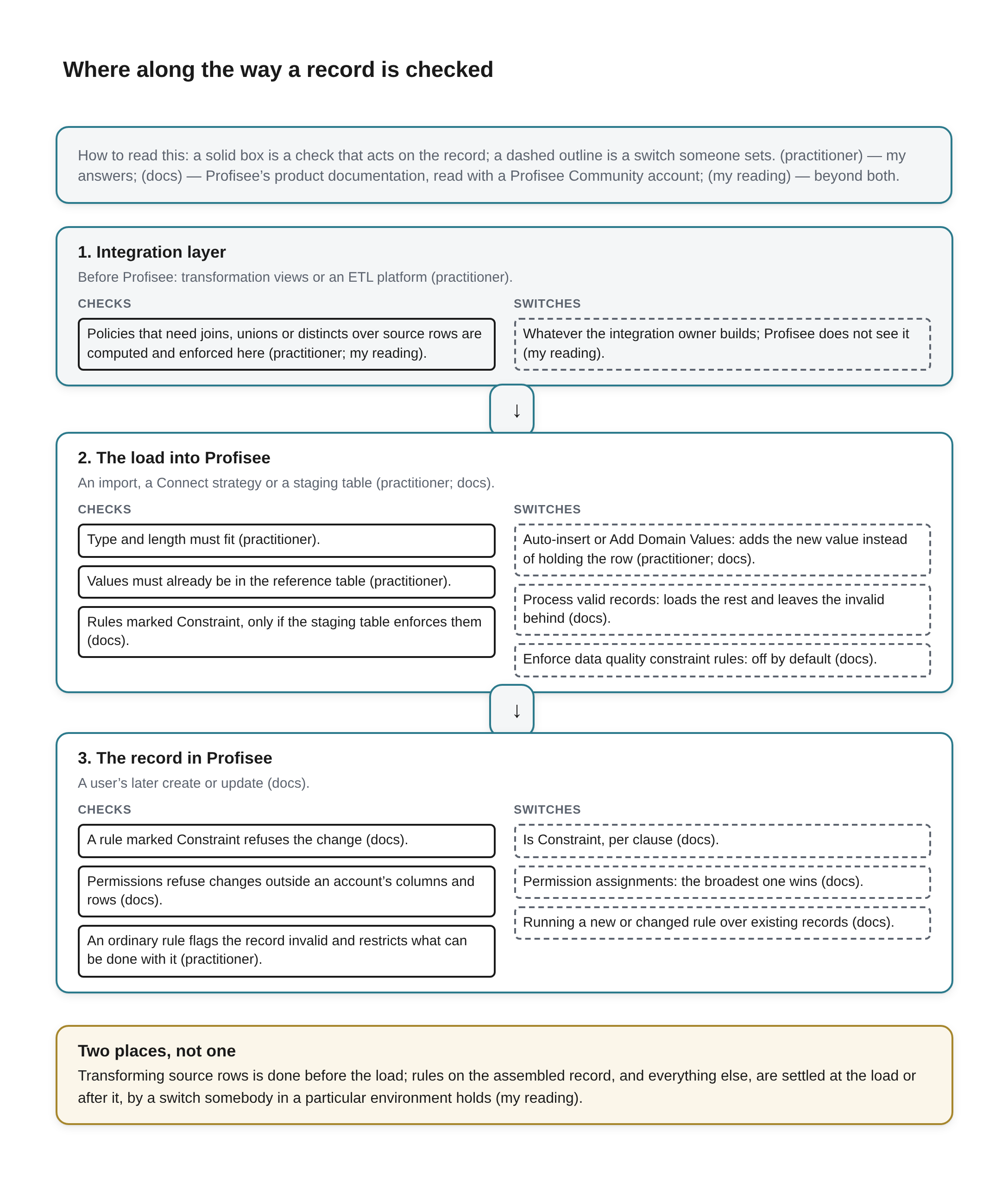
Where along the way a record is checked Beneath the title a key reads: How to read this: a solid box is a check that acts on the record; a dashed outline is a switch someone sets. (practitioner) — my answers; (docs) — Profisee’s product documentation, read with a Profisee Community account; (my reading) — beyond both.
Three stages stacked from top to bottom, joined by downward arrows. Each stage has a heading, a short note, and two columns: Checks, in solid boxes, on the left, and Switches, in dashed boxes, on the right.
- 1. Integration layer. Before Profisee: transformation views or an ETL platform (practitioner). Checks: Policies that need joins, unions or distincts over source rows are computed and enforced here (practitioner; my reading). Switches: Whatever the integration owner builds; Profisee does not see it (my reading).
- 2. The load into Profisee. An import, a Connect strategy or a staging table (practitioner; docs). Checks: Type and length must fit (practitioner). Values must already be in the reference table (practitioner). Rules marked Constraint, only if the staging table enforces them (docs). Switches: Auto-insert or Add Domain Values: adds the new value instead of holding the row (practitioner; docs). Process valid records: loads the rest and leaves the invalid behind (docs). Enforce data quality constraint rules: off by default (docs).
- 3. The record in Profisee. A user’s later create or update (docs). Checks: A rule marked Constraint refuses the change (docs). Permissions refuse changes outside an account’s columns and rows (docs). An ordinary rule flags the record invalid and restricts what can be done with it (practitioner). Switches: Is Constraint, per clause (docs). Permission assignments: the broadest one wins (docs). Running a new or changed rule over existing records (docs).
A full-width box outlined in amber, headed Two places, not one: Transforming source rows is done before the load; rules on the assembled record, and everything else, are settled at the load or after it, by a switch somebody in a particular environment holds (my reading).
What Profisee is the wrong place for
The question also asked for a policy I had enforced outside Profisee, and why. My answer named a kind of logic rather than a single policy:
Unions, joins from multiple source tables, distincts or other 'complex' SQL logic. The default Profisee import methods are primarily based around straight data imports without a lot of in-flight transformations. That's normally the domain of transformation views or 'real' ETL platforms like Fabric, Informatica or Talend.
That is the fourth answer, outside, and it is easy to underrate. Profisee's own documentation describes the staging tables as "the interface for ETL (Extract, Transform, and Load) processes to load data in bulk into your master data model" [12]: the transform happens before the interface. A policy whose test needs source rows joined, unioned or reduced to distinct rows before anything can be judged cannot be checked by an import that loads each source's rows as they stand. That is different from a rule on the assembled record, such as the ship-to address agreeing with the account's country, which Profisee can judge at level three once both values are in the record.
An illustration, not a case from a client: a council approves "a customer is active if it has an open order in the ERP or a purchase in the web shop in the last year, and only active customers are sent to the marketing platform." No single source holds the answer, so no straight load of one source's rows can test it. Somebody writes the union and the date logic in a transformation view or an ETL job, and Profisee receives the result, perhaps as an Active flag on the customer. From there, levels one to three apply to the flag: it can be required, restricted to a list, checked by a rule. If only the computed flag is loaded, what they cannot do is check whether it is right. Loading the last-order and last-purchase dates instead does not settle it either, as I read it: a test against "the last year" changes its answer with the calendar while the record does not, and Profisee's rules judge only data that changes until someone runs them over the entity [8][9]. The time-relative part is better recomputed at every load, outside the hub. Either way, the policy the council approved lives in someone's SQL, and the person who maintains that SQL holds its switch.
That is a reason for the council to know where its policies are implemented, not a reason to avoid ETL. The risk in splitting a rule across layers has been measured outside master data. A 2020 study of open-source web applications found that "Nearly 25% of the constraints specified through application validation are missing in the DB," and that such inconsistencies "contributed to 24 out of the 114 issues" the authors examined [21]. That was application code against its own database, not an MDM hub against its integration layer, so take it as an indication of how often a rule written in two places stops being the same rule, not as a measure of anything in Profisee.
The case against the switches
There are two serious objections to the way I have framed this.
The first says enforcement does not belong in a hub at all. The data contracts movement treats quality as an agreement made where the data is produced. Andrew Jones, who wrote a book on the practice, defines the idea in one line: "A data contract is an agreed interface between the generators of data and its consumers" [22]. Zhamak Dehghani's data mesh principles put it more bluntly: "The accountability of data quality shifts upstream as close to the source of the data as possible" [23]. On that view, every switch I have described is a downstream patch on a problem that should have been prevented by the system that created the record.
I agree with more of that than a Profisee partner might be expected to. Transformation that joins, unions or collapses duplicate rows in an extract belongs before the load, and each producer should own its own fields and the shape of its rows. Where I part company is on master data specifically. The rules a council cares most about in a master data programme are often exactly the ones no single producer can enforce, because the record they govern is assembled from several producers. The tax identifier comes from procurement's system, the address from the ERP, the risk flag from a third party. A contract can make each producer honest about its own fields. Whether the assembled record obeys the council's policy is a question that only exists after the sources meet, and that is where a hub's switches sit. The objection narrows my claim; it does not remove it.
The second objection says that stops cause the harm they are meant to prevent. A study of hospital barcode systems for giving medication, built to stop the wrong drug reaching the wrong patient, "identified 15 types of workarounds" and "31 types of causes of workarounds," and a sentence in its authors' discussion fits any preventive control: "With rare exceptions, it should be easier to follow policy than work around it" [24]. A medication system is not a master data hub, and its failures carry far higher stakes, but the mechanism is general. A required field that blocks a legitimate record gets a placeholder typed into it. A constraint that blocks a whole department's work gets a quiet exception. Richard Wang and Diane Strong's definition of data quality as data "fit for use by data consumers" carries the same warning in a different key [25]: one consumer's rule, enforced as a hard stop at the hub, can refuse a record that is perfectly fit for another consumer's use.
This objection I accept almost entirely, and it is why the article does not say "make every rule a constraint." Most of the defaults cited here lean the same way: Profisee's load option ships off, Master Data Services saves the failing value, Databricks writes invalid records through; dbt is the exception. A flag that a working queue resolves is often the better control. The argument here is narrower: whichever way each switch is set, someone set it, and the council should know who.
A map, and a question for the council
Put the levels, the permissions and the work outside together, and the council's four policies sort themselves. The supplier tax identifier: its length can be stopped at level one, its presence by a rule marked as a constraint (the documentation's own example is a required Name), its format can be checked by a rule, which flags unless someone marks it a constraint, and whether it is the supplier's own identifier needs a check against a register outside Profisee. The approved country codes: held at level two, unless a load is allowed to add to the list. The ship-to address in the account's country: a rule at level three, flagged by default, stopped if marked, held if somebody writes logic on the status. Payment terms changed only by procurement's data team: stopped by permissions for people, and for loads that run as Profisee users, for as long as team memberships do not widen them; a load run directly on SQL by a database account with the required permissions answers to its database role instead.
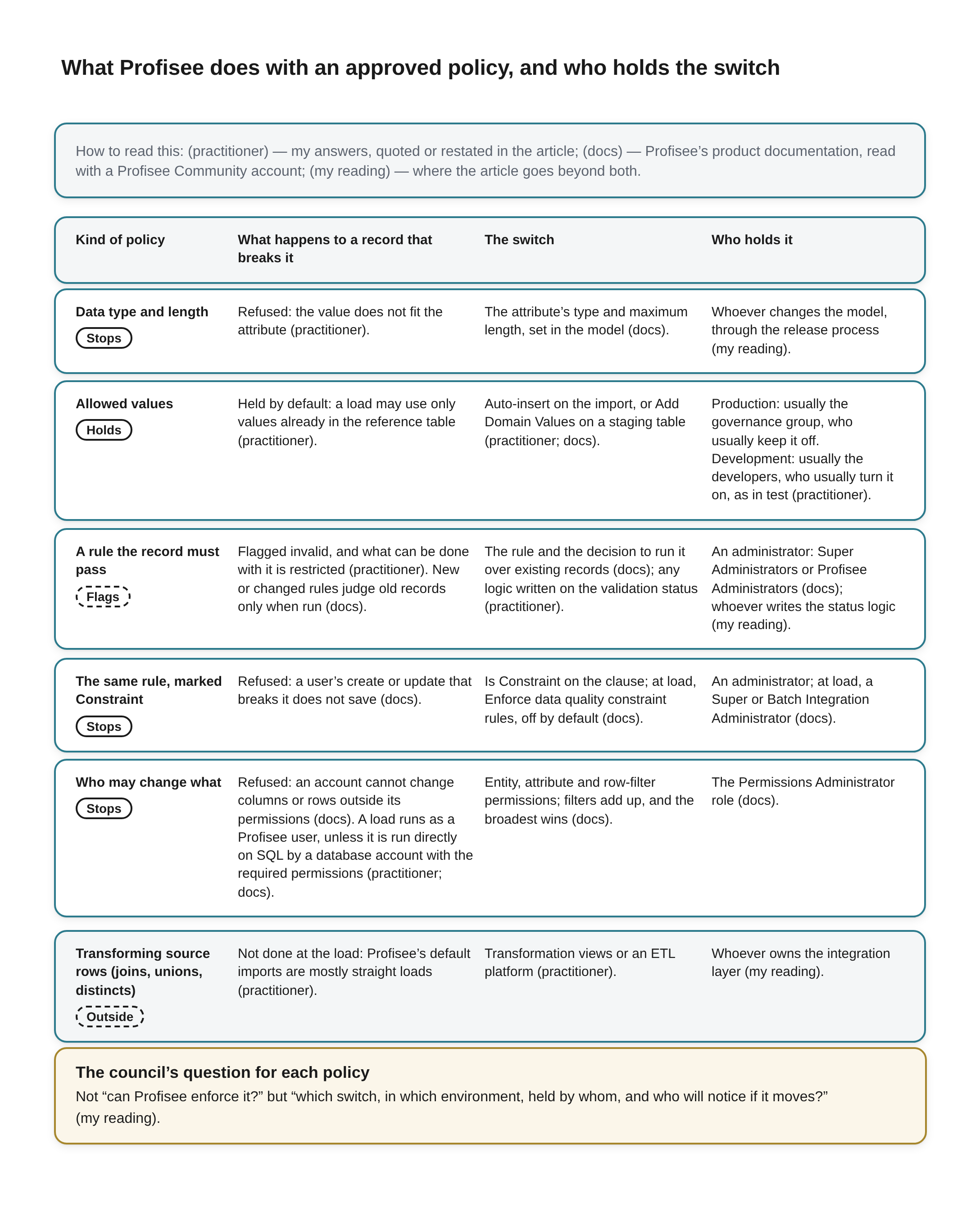
What Profisee does with an approved policy, and who holds the switch Beneath the title a key reads: How to read this: (practitioner) — my answers, quoted or restated in the article; (docs) — Profisee’s product documentation, read with a Profisee Community account; (my reading) — where the article goes beyond both.
A table with four column headings: Kind of policy, What happens to a record that breaks it, The switch and Who holds it. Under each policy name is a badge: Stops, Holds, Flags or Outside; Flags and Outside have dashed borders.
- Data type and length (badge: Stops). What happens to a record that breaks it: Refused: the value does not fit the attribute (practitioner). The switch: The attribute’s type and maximum length, set in the model (docs). Who holds it: Whoever changes the model, through the release process (my reading).
- Allowed values (badge: Holds). What happens to a record that breaks it: Held by default: a load may use only values already in the reference table (practitioner). The switch: Auto-insert on the import, or Add Domain Values on a staging table (practitioner; docs). Who holds it: Production: usually the governance group, who usually keep it off. Development: usually the developers, who usually turn it on, as in test (practitioner).
- A rule the record must pass (badge: Flags). What happens to a record that breaks it: Flagged invalid, and what can be done with it is restricted (practitioner). New or changed rules judge old records only when run (docs). The switch: The rule and the decision to run it over existing records (docs); any logic written on the validation status (practitioner). Who holds it: An administrator: Super Administrators or Profisee Administrators (docs); whoever writes the status logic (my reading).
- The same rule, marked Constraint (badge: Stops). What happens to a record that breaks it: Refused: a user’s create or update that breaks it does not save (docs). The switch: Is Constraint on the clause; at load, Enforce data quality constraint rules, off by default (docs). Who holds it: An administrator; at load, a Super or Batch Integration Administrator (docs).
- Who may change what (badge: Stops). What happens to a record that breaks it: Refused: an account cannot change columns or rows outside its permissions (docs). A load runs as a Profisee user, unless it is run directly on SQL by a database account with the required permissions (practitioner; docs). The switch: Entity, attribute and row-filter permissions; filters add up, and the broadest wins (docs). Who holds it: The Permissions Administrator role (docs).
- Transforming source rows (joins, unions, distincts) (badge: Outside). What happens to a record that breaks it: Not done at the load: Profisee’s default imports are mostly straight loads (practitioner). The switch: Transformation views or an ETL platform (practitioner). Who holds it: Whoever owns the integration layer (my reading).
A full-width box outlined in amber, headed The council’s question for each policy: Not “can Profisee enforce it?” but “which switch, in which environment, held by whom, and who will notice if it moves?” (my reading).
None of that is a criticism of the council's policies or of the platform. It is a description of where the enforcement of an approved policy actually lives, and in every row it lives in a setting. That is why I think the council's question is the wrong one when it asks "can Profisee enforce this?" The useful question, for each policy, is which switch, in which environment, held by whom, and who will notice if it moves.
The last of those is where the auditors' point earns its place. Detective controls, the Syracuse page said, are "still critical" partly to show that the preventive ones are functioning [1]. A council does not need to read rule definitions or permission screens. It can ask, once a quarter, for a short list: each policy it has approved, the switch that enforces it in production, the setting it is at today, whether that setting changed since the last list, and, for each approved list, how many members it has. That is a report the Data Governance Group can produce from things it already owns, though whether it comes from one query or from opening each import template and staging configuration in turn depends on the installation, and if it is the latter the council should know that too. The setting tells a council whether the door on an approved list is open; the member count, set against last quarter's, tells it whether the list has grown; together they tell it where to look for a list growing by itself.
References
[1] Syracuse University Internal Audit, "Internal Control Types and Activities," Syracuse University Finance (undated). Read in full 2026-11-09. https://finance.syr.edu/audit/general-internal-controls/internal-control-types-and-activities/
[2] Profisee, "Create and Edit Attributes in the Portal," Profisee Platform Help (2026 R3 selected), support.profisee.com. Login required; the free-form and domain-based attribute settings read 2026-11-09 with a Profisee Community account. Vendor documentation (the vendor we partner with). https://support.profisee.com/wikis/profiseeplatform/create_and_edit_attributes_in_the_portal
[3] Profisee, "Attribute Indexing and Unique Constraints," Profisee Platform Help (2026 R3 selected), support.profisee.com. Login required; the unique-constraint section read 2026-11-09 with a Profisee Community account. Vendor documentation (the vendor we partner with). https://support.profisee.com/wikis/profiseeplatform/attribute_indexing_and_unique_constraints
[4] Profisee, "Add and Update Data Using a Merge Table," Profisee Platform Help (2026 R3 selected), support.profisee.com. Login required; read in full 2026-11-09 with a Profisee Community account. Vendor documentation (the vendor we partner with). https://support.profisee.com/wikis/profiseeplatform/add_and_update_data_using_a_merge_table_8-0-1
[5] Profisee, "Staging FAQ," Profisee Platform Help (2026 R3 selected), support.profisee.com. Login required; read in full 2026-11-09 with a Profisee Community account. Vendor documentation (the vendor we partner with). https://support.profisee.com/wikis/profiseeplatform/staging_faq
[6] Adam Wiggins, "III. Config," The Twelve-Factor App (first published 2011, maintained online). Read in full 2026-11-09. https://12factor.net/config
[7] Microsoft, "BULK INSERT (Transact-SQL)," SQL Server documentation, Microsoft Learn. The CHECK_CONSTRAINTS argument read 2026-11-09. Cited for what the product documents; the product is not assessed. https://learn.microsoft.com/en-us/sql/t-sql/statements/bulk-insert-transact-sql?view=sql-server-ver16
[8] Profisee, "Data Quality Rules Overview," Profisee Platform Help (2026 R3 selected), support.profisee.com. Login required; read in full 2026-11-09 with a Profisee Community account. Vendor documentation (the vendor we partner with). https://support.profisee.com/wikis/profiseeplatform/data_quality_rules_overview
[9] Profisee, "Data Quality Rules Evaluation Process," Profisee Platform Help (2026 R3 selected), support.profisee.com. Login required; read in full 2026-11-09 with a Profisee Community account. Vendor documentation (the vendor we partner with). https://support.profisee.com/wikis/profiseeplatform/data_quality_rules_evaluation_process
[10] Profisee, "Create and Edit Validation Rule Clauses," Profisee Platform Help (2026 R3 selected), support.profisee.com. Login required; the clauses-grid section read 2026-11-09 with a Profisee Community account. Vendor documentation (the vendor we partner with). https://support.profisee.com/wikis/profiseeplatform/create_and_edit_validation_rule_clauses
[11] Profisee, "Creating New Rules," Profisee Platform Help (2026 R3 selected), support.profisee.com. Login required; read 2026-11-09 and re-read 2026-11-10 with a Profisee Community account. Vendor documentation (the vendor we partner with). https://support.profisee.com/wikis/profiseeplatform/creating_new_rules
[12] Profisee, "Staging Tables Overview," Profisee Platform Help (2026 R3 selected), support.profisee.com. Login required; the opening sections read 2026-11-09 with a Profisee Community account. Vendor documentation (the vendor we partner with). https://support.profisee.com/wikis/profiseeplatform/staging_tables_overview
[13] Profisee, "Manage Staging Tables via FastApps Studio," Profisee Platform Help (2026 R3 selected), support.profisee.com. Login required; the staging table configuration options read 2026-11-09 with a Profisee Community account. Vendor documentation (the vendor we partner with). https://support.profisee.com/wikis/profiseeplatform/manage_staging_tables_via_fastapps_studio
[14] Profisee, "ValidationStatus Enumeration," Profisee Platform Help (2026 R3 selected), support.profisee.com. Login required; read in full 2026-11-09 with a Profisee Community account. Vendor documentation (the vendor we partner with). https://support.profisee.com/wikis/profiseeplatform/validationstatus_enumeration
[15] Microsoft, "Business Rules (Master Data Services)," SQL Server documentation, Microsoft Learn. The rule-behaviour passages read 2026-11-09. Cited for what the product documents; the product is not assessed. https://learn.microsoft.com/en-us/sql/master-data-services/business-rules-master-data-services?view=sql-server-ver16
[16] Semarchy, "Data Quality," Semarchy xDM 5.3 documentation. Read in full 2026-11-09. Cited for what the product documents; the product is not assessed. https://semarchy.com/doc/semarchy-xdm/xdm/5.3/Design/data-quality/data-quality.html
[17] Databricks, "Manage data quality with pipeline expectations," Databricks documentation. Read in full 2026-11-09. Cited for what the product documents; the product is not assessed. https://docs.databricks.com/aws/en/ldp/expectations
[18] dbt Labs, "severity," dbt developer reference (resource configs). Read in full 2026-11-09. Cited for what the product documents; the product is not assessed. https://docs.getdbt.com/reference/resource-configs/severity
[19] Profisee, "Permissions Overview," Profisee Platform Help (2026 R3 selected), support.profisee.com. Login required; read in full 2026-11-09 with a Profisee Community account. Vendor documentation (the vendor we partner with). https://support.profisee.com/wikis/profiseeplatform/permissions_overview
[20] Profisee, "Use Staging Tables, Views, and Stored Procedures to Load Bulk Data," Profisee Platform Help, support.profisee.com. Login required; read 2026-11-10 with a Profisee Community account. Vendor documentation (the vendor we partner with). https://support.profisee.com/wikis/profiseeplatform/use_staging_tables_views_and_stored_procedures_to_load_bulk_data_8-0-1
[21] Junwen Yang, Utsav Sethi, Cong Yan, Alvin Cheung and Shan Lu, "Managing Data Constraints in Database-Backed Web Applications," Proceedings of the 42nd International Conference on Software Engineering (ICSE 2020). Abstract and findings read 2026-11-09. https://hyperloop-rails.github.io/278.pdf
[22] Andrew Jones, Driving Data Quality with Data Contracts (Birmingham: Packt, 2023), chapter 2, "Introducing Data Contracts," section "What is a data contract?". The opening of the section read 2026-11-09; the rest is behind the publisher's paywall. https://packtpub.com/en-cl/product/driving-data-quality-with-data-contracts-9781837635009/chapter/chapter-2-introducing-data-contracts-3/section/what-is-a-data-contract-ch03lvl1sec11
[23] Zhamak Dehghani, "Data Mesh Principles and Logical Architecture," martinfowler.com, 3 December 2020. Read in full 2026-11-09. https://martinfowler.com/articles/data-mesh-principles.html
[24] Ross Koppel, Tosha Wetterneck, Joel Leon Telles and Ben-Tzion Karsh, "Workarounds to Barcode Medication Administration Systems: Their Occurrences, Causes, and Threats to Patient Safety," Journal of the American Medical Informatics Association 15, no. 4 (2008): 408–423. Abstract, discussion and conclusion read 2026-11-09. https://pmc.ncbi.nlm.nih.gov/articles/PMC2442264
[25] Richard Y. Wang and Diane M. Strong, "Beyond Accuracy: What Data Quality Means to Data Consumers," Journal of Management Information Systems 12, no. 4 (1996): 5–33. Read in full 2026-11-09 from the copy on MIT's Total Data Quality Management site. https://web.mit.edu/tdqm/www/tdqmpub/beyondaccuracy_files/beyondaccuracy.html