The Queue Nobody Worked: Stewardship Accountability, From a Spreadsheet Estate to Profisee
Weaving Intelligence (House AI Style), with Jeff Shabel’s Experiential Commentary
The stewardship work that nobody does rarely starts as a design flaw. In most of the companies where I have found a backlog of unworked tasks, it started with a person: someone who had carried the work for years, automated much of it, and then left. Asked who had been accountable for the work that stopped, and what changed when I rebuilt it, I began with the man who used to do it:
‘Tom’ was held accountable because he had been with the Company for thirty years, had dozens of spreadsheets that automated his processes and he also wrote an Access Application that other departments used and incorporated into their reports. Then ‘Tom’ retired and everything went to heck. ‘Susan,’ his manager was responsible for filling in the gap, then she left the company about a month later and took a similar position in another company. ‘Rich’ was the interim manager, but he was replaced by ‘Denise’ after she was hired, and she was ultimately responsible as soon as she came on board.
The names are pseudonyms and the order of events is not. Look at what the "legacy" was in that story, because the usual history of stewardship would have you expect an old master data product being retired for a new one. There was no master data product. There were dozens of spreadsheets, an Access application that other departments had built their own reports on, and 'Tom'. The system of record for stewardship was one man's working habits, and it held together for as long as he was there to run it.
Then look at what happened to accountability when he left. It moved exactly the way an organisation chart says it should: to 'Susan', his manager; to 'Rich', who held the post for a while; to 'Denise', who owned it the day she arrived. At every step someone was responsible. At no step did the knowledge of what the spreadsheets did, which reports leaned on the Access application, or which corrections had to happen by when, move with the responsibility. The title travelled and the work did not.
Here is the claim I will defend, in two parts that rest on different evidence. The cause is what I have found across the companies where I met this backlog: unworked stewardship tasks are usually an accountability that was attached to a person rather than to a position. The repair comes from one rebuild, offered as a pattern I would repeat rather than as a law: rebuild the work around positions, with every item visible and ageing against a clock. That rebuild gives management a path to follow. It does not lift the ultimate responsibility off the people who use the data. And on Profisee the clocks and the digest are native settings on each workflow task, while who answers for the work, and where it goes when a clock runs out, is design the product leaves to you.
A spreadsheet estate is a person
The research on spreadsheets is not kind to an estate like the one 'Tom' built. Raymond Panko's review of fifteen years of studies found that they had "concluded unanimously that spreadsheet errors are both common and non-trivial", and that the only technique shown to be effective was "cell-by-cell code inspection" [1]. That is a demanding remedy even when the author is still in the building. When the author has retired, inspection means reverse-engineering a working process from its outputs while the people downstream wait for the next run.
The software world has a blunter name for the risk. A project's truck factor is the smallest number of people who would have to be hit by a truck, or quit, before it stalls. Avelino and colleagues estimated it for 133 popular open-source projects and found that 65% had a truck factor of two or fewer [2]. Those are public projects built for many contributors, so I would not carry the percentage across to anyone's stewardship estate. The direction is the useful part: if knowledge concentrates that tightly where collaboration is the whole design, an estate written by one man for his own use has a truck factor of one by construction.
There is also a reason the 'Tom' in a given company tends to be the person nearest the door. The US Bureau of Labor Statistics reported median tenure of 4.1 years in January 2026, and 9.6 years for workers aged 55 to 64, more than three times the figure for those aged 25 to 34 [3]. Thirty years with one employer is unusual, and the people who have it are, by the arithmetic of tenure, mostly the people approaching retirement. The person who has been there long enough to build the estate is the person most likely to leave it.
My own rule for handoffs has always been that there should be nothing special to do. If the job is being done properly, the policies, procedures and documents come out of the work as by-products, so the organisation is ready to hand the process to a client, another firm or a new hire at any time, and the knowledge is lodged somewhere in the business instead of in the heads of the engineers, architects and stewards. The estate 'Tom' left behind was the opposite case: it worked because he was there, and nothing in it was designed to work once he was not.
Where unworked tasks come from
Asked whether 'Tom' was an unusual case or a typical one, I put the general version like this:
In most companies with ‘unworked’ tasks, they generally arise from a similar set of circumstances as those illustrated above. Ultimate responsibility falls to the users of the data because they depend on it for their deliverables and, if no one else is actively helping them or fixing their problem, they’ll either do it themselves as best they can or leave. That’s why I said what I did about ‘Who Owns the Data, Really?’
That last sentence points at Who Owns the Data, Really?, which argued that ownership of a data problem settles, in practice, on whoever the error hurts. I will not argue it again. This piece starts where that one stops: once the users of the data are carrying the problem, what gives them any leverage over getting it fixed?
The users' half of that sentence is better documented than most people expect. Thomas Redman, writing on the cost of poor data quality, describes the cost arriving "as people accommodate bad data by correcting errors, seeking confirmation in other sources, and dealing with the inevitable mistakes that follow" [4]. That is the same behaviour as the users who "do it themselves as best they can", seen from the ledger instead of the desk. They become the stewards nobody appointed, and nobody measures the work they do.
The stewards who were appointed are often in a similar position. Profisee's own description of the role says that master data stewardship "can either be their full-time job or just one of their responsibilities" [5]. In my experience the second case is the common one, and it is where the trouble lives: a business steward whose job includes stewardship, rather than is stewardship, fits it around the work they are actually measured on. When a programme is funded as a project and its running cost is simply expected to be absorbed, existing staff take stewardship on in addition to everything they already did. A queue that belongs to everyone's spare time belongs to no one's day.
The one lever I have found that reliably gets stewards into the tool is making it part of the day's work and moving their performance and reporting measures onto it. Leave the queue off anyone's measures and it is optional, and optional work is the first work dropped when a manager leaves and the replacement is still learning where the reports come from.
The governance literature names the gap but does not close it. Weber, Otto and Österle observed that companies had "mostly assigned accountabilities for DQM to Information Technology (IT) departments", and proposed a model of data quality roles, decision areas and responsibilities that together form "a responsibility assignment matrix" [6]. Khatri and Brown define governance as deciding which decisions must be made and who makes them, "the locus of accountability for decision-making" [7]. A matrix of roles and decision rights answers the question "whose job is this?". It does not answer the question 'Tom' actually posed, which is what happens to the job on the day its holder is gone.
What I rebuilt, and what each piece is for
What follows rests on my own record rather than on anything the sources establish. Asked what I actually changed when the work was rebuilt, I listed it:
When I rebuilt it, I actively put in place processes that were assigned to specific job responsibilities that included daily emailed digests of activity that needed to be completed, dashboards showing outstanding items that had been backing up, tracking reports with times to live, SLAs and, finally, escalation policies and procedures that were tied to positions, not individuals.
Six pieces, and each one answers a different way the old arrangement failed. I will take them in order, and say where I am adding reasoning of my own to what I built.
Work assigned to job responsibilities. The queue belongs to a role, and whoever holds the role inherits it the day they start. That sounds obvious until you notice how rarely it is true of stewardship. The corrections 'Tom' made were in nobody's job description except, informally, his. Robert Seiner's case for non-invasive governance makes the same move from the other direction: it "formalizes existing responsibilities as components of a governance program", on the observation that people already do much of the work "in an informal or inefficient manner" [8]. Formalising it is what lets the work survive a resignation.
A daily emailed digest. One message a day, to the person in the role, listing what needs doing. The reasoning I add here is about volume. An alert per item degrades fast. Google's site reliability engineers warn that low-priority alerts arriving every hour "disrupt productivity" and teach people to give serious alerts "less attention than necessary" [9]. That is operations advice, not a finding about data stewardship, but its direction is enough to prefer one considered list a day to a stream of interruptions. It also suits how stewardship actually happens: in many businesses stewards have other responsibilities, so they need to step into the queue, make an inline decision (approve, reject, pick one) and get back to their real work.
Dashboards of backed-up items. The digest is for the person doing the work. The dashboard is for the people responsible for that person. It shows the pile, so that a backlog is visible before it becomes a crisis. My standing view is that having reports is not the same as monitoring them, and that monitoring means tying notifications to the reports so someone is told when things move outside an acceptable band. The digest and the dashboard are that principle applied to work instead of data.
Tracking reports with times to live. Every item has an age and a time after which it is no longer pending but late. Without that, a backlog is a list. With it, a backlog is a list of promises, some of them broken, with dates on them.
Service levels. A time to live says when an item is late. A service level says what was promised and to whom. One design detail I would add, and it comes from outside master data: Microsoft's customer service platform lets an agreement carry a warning time as well as a failure time, each able to trigger its own action, so that "Is Nearing Non-Compliance" fires before the breach rather than after it [10]. A warning that arrives while there is still time to act is worth more than a report of the failure.
Escalation tied to positions, not individuals. When an item breaches, it goes up, and where it goes is a position. This is the piece that answers 'Susan' leaving so soon after 'Tom'. An escalation route that names a person dies with that person's departure; one that names a post lands on whoever holds it, including an interim like 'Rich'. Operations tooling has worked this way for years. PagerDuty's escalation policies "connect services to individual users and/or schedules" [11], and a schedule is a rotation, not a name. Google's engineers describe teams with "both a primary and a secondary on-call rotation", the secondary acting in some teams "as a fall-through for the pages the primary on-call misses" [9]. Stewardship can borrow the same shape: the role, then the role above it, never a named individual with nothing behind them.
Those are the six I listed when first asked. Two more belong beside them.
Automated detection. An automated system identified data issues quickly, so the stewards worked the issues automation could not resolve.
Stewards who can fix at the source. The stewards could reach the source systems as well as the MDM system, so the source system was the main place a fix was made, and a fix there cleared the item from the reports without any action in MDM. That only works for an item the source system can resolve; mapping and cross-system deduplication still happen in MDM.
Put the first six pieces side by side with the estate 'Tom' ran and the difference is not that the new arrangement has more accountability in it. The old one had plenty. It is that every point where the old chain depended on one person now depends on a post.
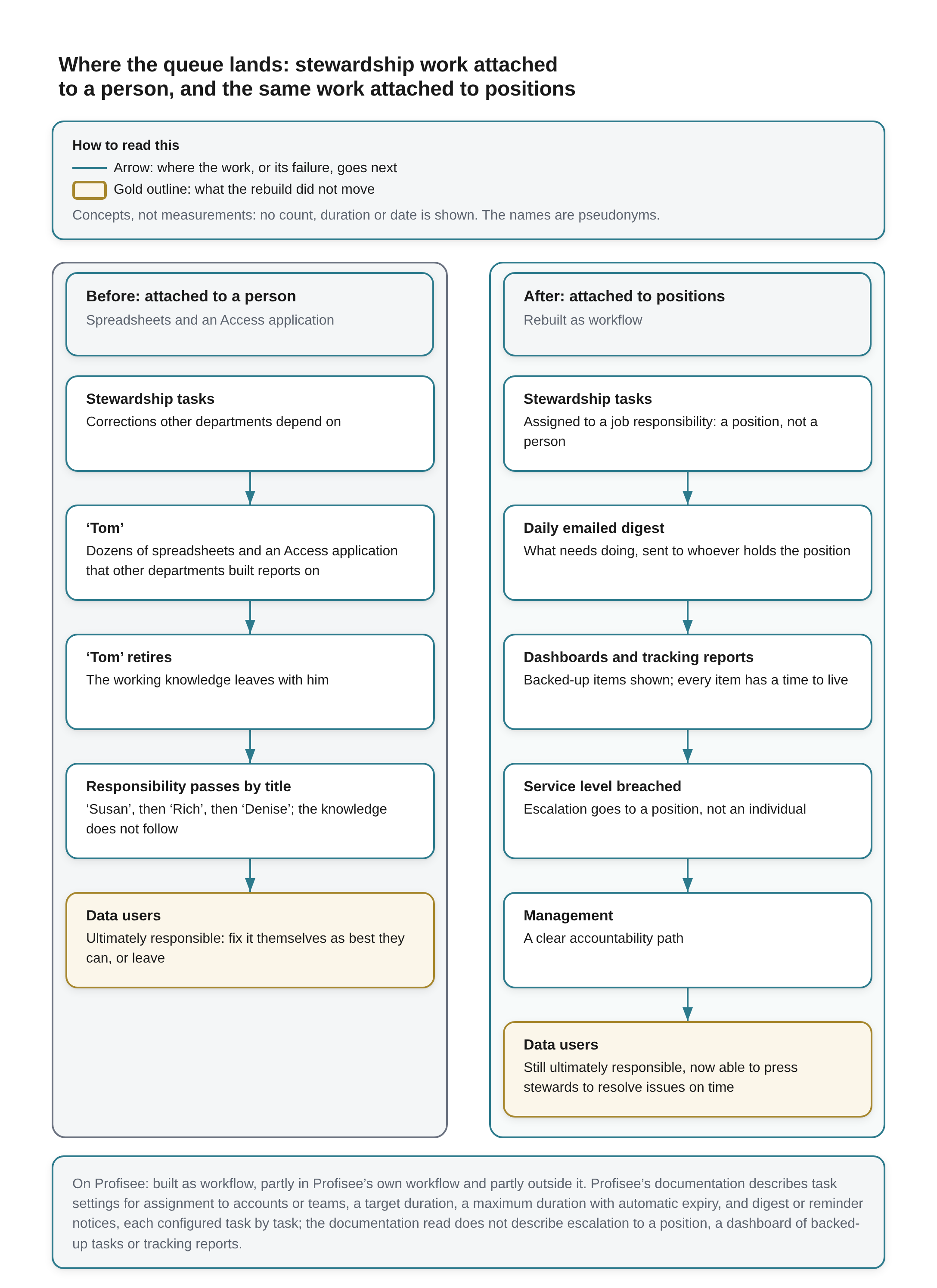
Where the queue lands: stewardship work attached to a person, and the same work attached to positions A key across the top reads: How to read this Arrow: where the work, or its failure, goes next. Gold outline: what the rebuild did not move. Concepts, not measurements: no count, duration or date is shown. The names are pseudonyms.
Left column, headed Before: attached to a person (Spreadsheets and an Access application), five boxes joined by downward arrows:
- Stewardship tasks: Corrections other departments depend on.
- ‘Tom’: Dozens of spreadsheets and an Access application that other departments built reports on.
- ‘Tom’ retires: The working knowledge leaves with him.
- Responsibility passes by title: ‘Susan’, then ‘Rich’, then ‘Denise’; the knowledge does not follow.
- Data users: Ultimately responsible: fix it themselves as best they can, or leave. Outlined in gold.
Right column, headed After: attached to positions (Rebuilt as workflow), six boxes joined by downward arrows:
- Stewardship tasks: Assigned to a job responsibility: a position, not a person.
- Daily emailed digest: What needs doing, sent to whoever holds the position.
- Dashboards and tracking reports: Backed-up items shown; every item has a time to live.
- Service level breached: Escalation goes to a position, not an individual.
- Management: A clear accountability path.
- Data users: Still ultimately responsible, now able to press stewards to resolve issues on time. Outlined in gold.
A note across the bottom reads: On Profisee: built as workflow, partly in Profisee’s own workflow and partly outside it. Profisee’s documentation describes task settings for assignment to accounts or teams, a target duration, a maximum duration with automatic expiry, and digest or reminder notices, each configured task by task; the documentation read does not describe escalation to a position, a dashboard of backed-up tasks or tracking reports.
What it moved, and what it did not
Pressed on what the rebuild had actually achieved, I was careful about its limits:
This provided management with a clear accountability path and, while it didn’t shift the ultimate responsibility off of those who needed the data, it gave them the ability to effectively pressure the Data Stewards to help resolve the issues in a timely fashion.
I want to keep that claim exactly as modest as it is. The rebuild did not take the problem off the people who need the data. They still depend on it for their own deliverables, and when it is wrong it is still their deliverable that suffers. What changed is that they now had somewhere to push. Before, a user with a bad record could fix it themselves or complain to a manager who had inherited a spreadsheet estate. After, the same user could point at an item that was past its time to live, on a dashboard management reads, and the rebuild is designed so that an escalation goes to a post. That is leverage, not relief, and it is honest to call it that.
It would be easy to oversell what accountability machinery does. Philip Tetlock and Barbara Mellers, reviewing the research for the National Academies, put it bluntly: accountability "is no panacea", it sometimes has "perverse effects, increasing defensiveness", and proponents of outcome accountability worry that process accountability "can readily ossify into bureaucratic rituals and mutual backscratching" [12]. A green service-level dashboard is exactly the kind of ritual that worry describes if the users are still quietly correcting the data themselves. So the test I would apply is not whether the dashboard is green. It is whether the users' pressure gets results: whether items that breach actually move, and whether the corrections the users used to make on their own begin to show up in the stewards' queue instead.
By the first half of that test, the rebuild held. Clearing the backlog took several months, under significant pressure to move faster, and items that breached in that time were worked. Once it was cleared, most items, upwards of nine in ten, were resolved before their service-level deadline came near. The warning fired on rare occasions, usually over weekends, holidays and vacations, and once the backlog was cleared the service level itself was never breached. That steady state was easy to hold, and it is when I moved on to a different project.
That is my account of one rebuild, and I give no count or base for it.
The second half came out differently from how I had framed it. The last two pieces of the design did that work: automation found the issues, and the source systems were the main place the stewards fixed them, while mapping and cross-system deduplication still happened in MDM. So the share of items resolved before the deadline came near cannot separate what the escalation design did from what the automation and the fixes at the source did.
The strongest objection to the design comes from the other side, and it is a good one. The UK Treasury's review of analytical models found that "a key element of best practice involves establishing a single individual with overall responsibility for each model", because naming someone "contributes to effective QA by creating a sense of ownership and accountability"; in government that person is "a named individual with sufficient seniority" [13]. That reads as a direct challenge to "positions, not individuals".
I think the two fit together once ownership and routing are pulled apart. The review's owner is appointed to a role because of the role's seniority, and the review is concerned with ownership, which 'Tom' had in abundance. What failed in his story was not ownership. It was continuity: the route the work took, and the route its failures took, ran through people rather than posts. Name an owner by all means. Key the route to the position, so that when the named owner leaves, the queue, the digest, the service level and the escalation still land on whoever holds the job. What this rules out is an escalation path whose next step is a person's name with no post behind it.
Once the queue does clear, a different mistake follows. Workload drops, the stewards look idle, and the temptation is to re-task them, forgetting that master data work arrives in spikes when loads run, systems integrate or upstream volumes grow. I made that argument in Proving the Platform Is Delivering; a queue keyed to positions only works if the positions are still staffed.
What Profisee does on its own
A disclosure, because what follows assesses Profisee. The practice behind this publication is a Profisee partner: clients pay us for deployment work, a licence sale we refer earns us a referral fee from the vendor, and our services revenue depends on master data management being bought at all. Those interests run toward praise of Profisee, of the category and of Microsoft, inside whose platform Profisee positions itself, so weigh what I say in their favour below what I say against them. One interest runs the other way: building the accountability layer this piece describes is paid work for us, which gives us a reason to say the product does little of it natively. Discount that judgement too.
Asked which of those six pieces Profisee does natively, I did not give it much credit:
Profisee has come a long way, but it doesn't do much of that natively. About the only thing I've seen 'native' is some of the global reporting metrics that have just been released in 2026R3. Everything else is a Workflow add-on.
Pressed on what "natively" meant, given that Profisee's documentation describes settings for several of these pieces, I drew the line here:
Yes, the 'default' implementation has hooks for it, but you need to configure them appropriately. 'Native' functionality, to my mind, implies out of the box, without additional configuration beyond filling in pre-existing forms.
With that line drawn, here is what Profisee's own documentation describes. Profisee's public pages describe a workflow as a long-running process made of activities, each of which "generates tasks, which require input from users, known as participants"; it supports "both sequential and parallel stewardship tasks", including managerial reviews; and "notifications are automatically sent to users who are assigned a workflow task" [14]. Profisee's customer documentation, which needs a Profisee sign-in to read, goes further. In the templated workflow used before 2026 R3, each contribution or approval task carries a Target Duration, "the amount of time allotted for this task to meet or exceed performance expectations", and a Maximum Duration, after which "the task expires automatically if it does not complete in time"; its notifications can go out immediately, never, or as a digest "at regular intervals", the interval being a system-wide setting; and tasks can be assigned "to individual accounts or teams", though not to directory groups [22]. The 2026 R3 designer keeps a target and a maximum duration on each task, makes the automatic expiry a switch, and adds a delivery preference for when notices go out and a reminder sent once a set percentage of the target duration has passed [21].
Asked whether the duration and digest settings count as native by that line, I said they do:
Yes, those would be 'native,' since all you're doing is filling in a pre-existing form field. They're 'part' of the 'native' Profisee Workflow Framework--which is, itself, an extension of the, now deprecated, Microsoft Workflow libraries.
So, by my own definition, Profisee natively supports three of the mechanics my rebuild relied on: a service level as a task's target duration, a time to live as its maximum duration with automatic expiry, and notices batched into a digest. Tasks can also be assigned to teams rather than named people, which is the starting point for assigning work to a post. What those settings share is where they live: on tasks, inside a workflow somebody has designed, and none of them decides which team stands for which post, or keeps that true as people move.
Three things are not in the documentation read at all, and they are what my rebuild added: a dashboard of backed-up tasks, a tracking report of items past their time, and escalation to a position. The nearest thing to escalation is that in R3 a task which reaches its maximum duration ends with an outcome named Expired, and the designer lets that outcome be wired on to another activity, such as a notification to a set of users or teams [21]. That is a place to attach a route, not the route. Where an expired task goes next, which post hears about it, and what management sees of the pile are the accountability design, and that is the part the product does not supply.
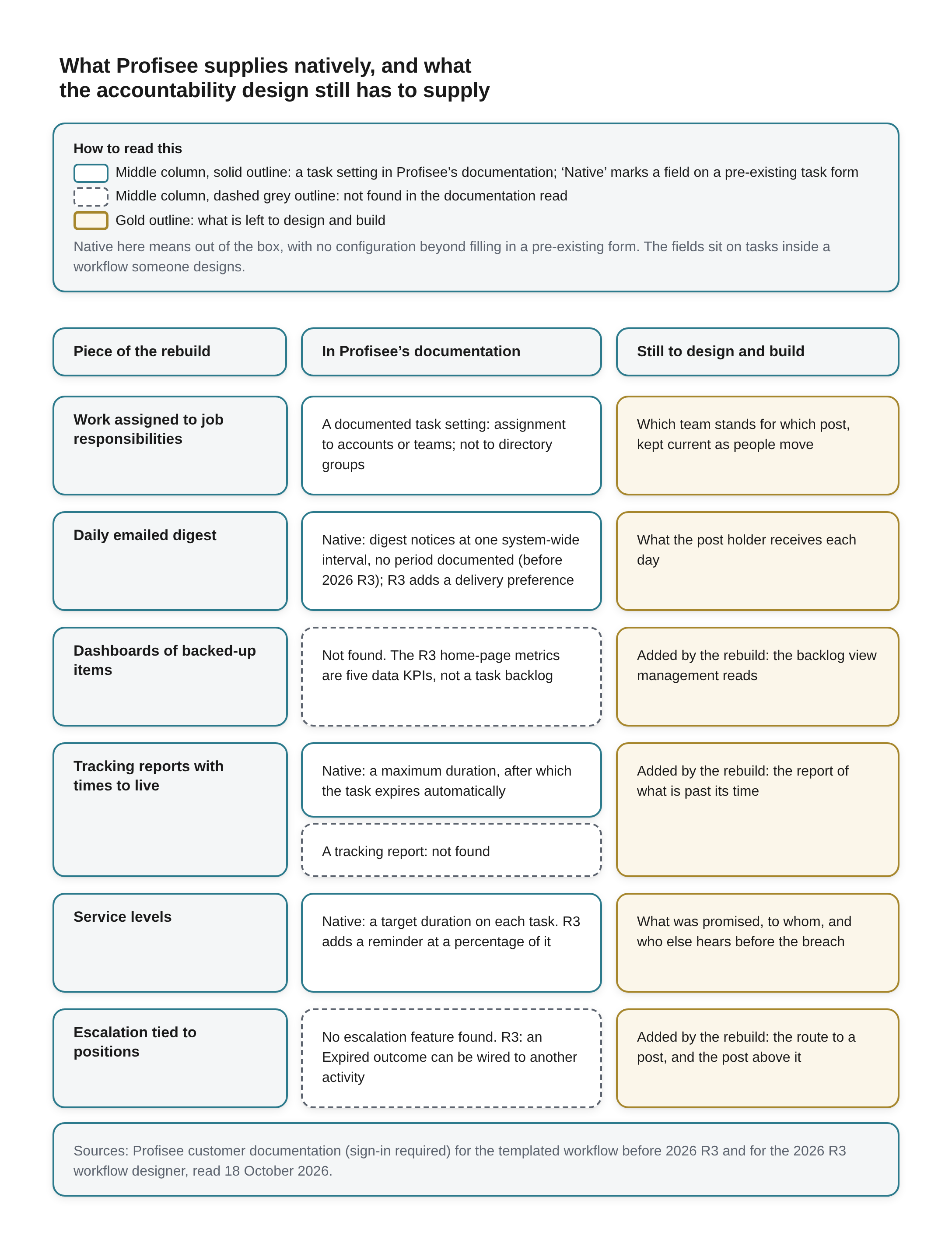
What Profisee supplies natively, and what the accountability design still has to supply A key across the top reads: How to read this Middle column, solid outline: a task setting in Profisee’s documentation; ‘Native’ marks a field on a pre-existing task form. Middle column, dashed grey outline: not found in the documentation read. Gold outline: what is left to design and build. Native here means out of the box, with no configuration beyond filling in a pre-existing form. The fields sit on tasks inside a workflow someone designs.
Three column headings: Piece of the rebuild, In Profisee’s documentation, Still to design and build. Six rows:
- Work assigned to job responsibilities. In Profisee’s documentation: A documented task setting: assignment to accounts or teams; not to directory groups. Still to design and build (gold outline): Which team stands for which post, kept current as people move.
- Daily emailed digest. In Profisee’s documentation: Native: digest notices at one system-wide interval, no period documented (before 2026 R3); R3 adds a delivery preference. Still to design and build (gold outline): What the post holder receives each day.
- Dashboards of backed-up items. In Profisee’s documentation (dashed grey outline): Not found. The R3 home-page metrics are five data KPIs, not a task backlog. Still to design and build (gold outline): Added by the rebuild: the backlog view management reads.
- Tracking reports with times to live. In Profisee’s documentation, two boxes: solid outline, Native: a maximum duration, after which the task expires automatically; dashed grey outline, A tracking report: not found. Still to design and build (gold outline): Added by the rebuild: the report of what is past its time.
- Service levels. In Profisee’s documentation: Native: a target duration on each task. R3 adds a reminder at a percentage of it. Still to design and build (gold outline): What was promised, to whom, and who else hears before the breach.
- Escalation tied to positions. In Profisee’s documentation (dashed grey outline): No escalation feature found. R3: an Expired outcome can be wired to another activity. Still to design and build (gold outline): Added by the rebuild: the route to a post, and the post above it.
A note across the bottom reads: Sources: Profisee customer documentation (sign-in required) for the templated workflow before 2026 R3 and for the 2026 R3 workflow designer, read 18 October 2026.
That leaves the obvious question of where the rest gets built. Pressed on whether "a Workflow add-on" meant Profisee's own workflow module or something built outside the product, I said both:
Both. I've done both and Profisee has done some extensive rework on workflows in their latest release, 2026R3. I haven't had an opportunity to work with 2026R3 yet, but I'm looking forward to it. I have done workflows with earlier versions of Profisee and also with Microsoft Workflows (off of which Profisee's previous workflow offering was based).
So the rebuild is best described as built as workflow, partly inside Profisee's own workflow and partly outside it: the durations and the digest are native settings inside the workflow, and the routes, the mapping of teams to posts and the backlog view are what gets built. The workflow framework those settings belong to is, on my account, an extension of Microsoft's workflow libraries; that lineage is mine to vouch for, and I have not seen Profisee document it publicly.
The split itself has a long history in the Microsoft master data world. Microsoft's own Master Data Services documentation for SQL Server 2008 R2 said its business rules could handle "basic workflow solutions" with e-mail notifications, and that anything needing "multi-tiered approvals or complex decision trees" should be sent to SharePoint to start a SharePoint workflow [15]. Basic routing in the product and the harder accountability logic in a separate workflow engine is not a gap someone forgot to fill. It has been the design for a long time.
It also carries a cost the master data vendor does not control. The parts built outside run on someone else's release calendar. Microsoft states that Windows Workflow Foundation "is not supported in .NET 6+" [16], and it retired SharePoint 2010 workflow in November 2020 and removed SharePoint 2013 workflow from existing tenants on April 2, 2026, advising anyone using "a 3rd party workflow engine" to check whether it depends on it [17]. I found no Profisee page that says which Microsoft libraries its own workflow framework uses, so I cite Microsoft here for Microsoft's stack only, not as proof of Profisee's lineage. I am saying that an accountability layer built outside the product has to be maintained on that product's timetable as well as yours, and that the parts of the Microsoft workflow stack people built these layers on have been moving.
What 2026 R3 changes, on the vendor's account
Profisee's 2026 R3 release, announced on October 12, 2026 by its chief technology officer, changes both halves of this picture on paper [18]. I have not used 2026 R3, so everything in this section is Profisee's description, not my experience.
On the native side, R3 adds what the announcement calls "a set of visual charts on the Profisee home page" that "gives stewards and administrators immediate visibility into the health of their master data", "so teams no longer need to build and maintain separate reports just to see where things stand" [18]. The release notes are more exact about what the charts are: five key performance indicators, Total Records, Data Quality Score, Active Data Quality Issues, Golden Records and Total Entities, each opening onto a view of the changes behind it over a period, and available to users who hold a new Analytics Viewer role [19]. Those are the global reporting metrics I meant. They are worth having. They are also measures of the data and of the size of the estate. A data quality score tells you how much is wrong. It does not tell you which task has been sitting in whose queue for how long, or who should hear about it next, and those are the questions accountability turns on.
On the workflow side, R3 introduces what the announcement describes as an all-new, web-based, drag-and-drop workflow designer, with a toolbox that includes "contribute and approval tasks, control flow, data nodes, notifications and calls to Profisee Connect integration strategies", using "the same expression language that powers Profisee's data quality rules engine and Connect", and "existing workflows from the 2026 R2 release upgrade automatically" [18]. The announcement does not go into task settings. The R3 help does: a workflow carries "Target Duration - how long the workflow is expected to take to complete", and existing templated workflows "are automatically converted to custom workflows and continue to run under their original configuration" [20], while the task-level durations, expiry, delivery preference and reminder described above sit on each task [21]. That is a substantial rework of the place where most of the accountability layer would be built, and a richer one. It is still the place, not the layer. I am looking forward to working with it. Until I have, I would plan the routes, the team-to-post mapping and the backlog view as things you design and build on top of the release, and set the durations and notices it does provide on every task rather than assume them.
Designing it on Profisee
If you are designing stewardship accountability on Profisee now, here is the order I would work in. Seven of the ten steps below carry the eight pieces of the rebuild, which are mine; the other three are starting from the departure, writing down what is built where, and tying the queue to measures. The warning-before-breach detail and the case against per-item alerts come from the sources above, and the settings named are the ones Profisee's documentation describes.
- Start from the departure, not the org chart. For every queue, ask what happens on the day the person working it leaves. If the honest answer is "it stops", that queue is attached to a person.
- Assign by role. Assign tasks to teams, not named accounts [21][22]. Make each team stand for a post and keep its membership current as people move, so the next holder inherits the queue on arrival.
- Send one digest rather than an alert per item, at the shortest interval the product allows, and daily where it can be set daily; the documentation sets no period [21][22]. Use it on every task, and make the decision possible from the message where the workflow allows it.
- Age everything. Give every task a maximum duration and decide whether it should expire [21][22]. Expiry ends a task without showing anyone the pile, so build the backlog view management reads.
- Set service levels with a warning before the breach. Use the target duration as the service level and R3's reminder as the assignee's warning [21], then decide who else hears, and when, so the first escalation is a prompt and not a post-mortem.
- Escalate to positions. Wire the Expired outcome onward to a post, with a deputy or the post above behind it, on every task [21]. An outcome with nowhere to go is the person-shaped route again.
- Automate detection. Let an automated system find the issues it can, so the stewards' queue holds what automation cannot resolve.
- Let stewards fix at the source. Give the stewards access to the source systems as well as MDM, so an item the source system can resolve is fixed there and clears from the reports; keep mapping and cross-system deduplication in MDM.
- Decide what is built where. Some of this belongs in Profisee's workflow, some in the tooling around it. Write down which, because the parts outside will move on another vendor's calendar.
- Tie it to measures. If the stewards' performance measures do not include the queue, none of the above survives the first busy quarter.
None of that is exotic. It is closer to what an operations team would set up for an on-call rotation than to anything specific to master data, which is rather the point: stewardship accountability fails in the same way any duty fails when it rests on one person, and it is repaired the same way.
Who still carries it
In the case I know best, the legacy was not a product. It was a person, a set of spreadsheets and an Access application, and the accountability passed down a line of managers while the knowledge left with the man who had it.
What the rebuild changed was where the work attaches. Positions instead of people; a digest instead of memory; an age on every item; a promise with a warning in front of it; a route upward that does not depend on who is in the building. What it did not change is who carries the problem in the end. The people who use the data still depend on it, still pay when it is wrong, and still fix it themselves when nobody else will. The difference is that they can now see the queue, point at what is late, and expect the escalation to reach someone.
Profisee supplies parts of this natively: a target duration and a maximum duration with expiry on each task, and digest notices. Beside them it documents assignment to accounts or teams and, in 2026 R3, a reminder before the target, home-page metrics and a rebuilt workflow designer I have yet to work with. What it does not supply is the accountability itself: which post each task lands on, where an expired task goes next, and the view of the pile that management reads. That part is built, partly in Profisee's workflow and partly around it. Designing around what a tool does not do is ordinary architecture, and it is most of what an implementation is for. Build it around posts, and the next 'Tom' can retire without taking the queue with him.
References
[1] Raymond R. Panko, "Spreadsheet Errors: What We Know. What We Think We Can Do," Proceedings of the European Spreadsheet Risks Interest Group (EuSpRIG) 2000, pp. 7–17; arXiv:0802.3457, submitted 23 February 2008. Abstract read 2026-10-18; full text not read. https://arxiv.org/abs/0802.3457
[2] Guilherme Avelino, Leonardo Passos, Andre Hora and Marco Tulio Valente, "A Novel Approach for Estimating Truck Factors," 24th International Conference on Program Comprehension (ICPC), 2016; arXiv:1604.06766. Abstract read 2026-10-18; full text not read. 133 open-source projects on GitHub; not enterprise data operations. https://arxiv.org/abs/1604.06766
[3] U.S. Bureau of Labor Statistics, "Employee Tenure in 2026," news release USDL-26-1532, 24 September 2026. Summary read 2026-10-18. US wage and salary workers, January 2026. https://www.bls.gov/news.release/tenure.nr0.htm
[4] Thomas C. Redman, "Seizing Opportunity in Data Quality," MIT Sloan Management Review, 27 November 2017. Opening section read 2026-10-18; the remainder is behind the subscription wall and was not read. Cited only for the sentence quoted in the body. https://sloanreview.mit.edu/article/seizing-opportunity-in-data-quality/
[5] Profisee, "Adaptive Data Stewardship" (page title "Data Stewardship | Profisee Platform"), profisee.com. Read 2026-10-18. Vendor page (the vendor we partner with). https://profisee.com/platform/stewardship/
[6] Kristin Weber, Boris Otto and Hubert Österle, "One Size Does Not Fit All—A Contingency Approach to Data Governance," ACM Journal of Data and Information Quality 1(1), article 4, June 2009, doi 10.1145/1515693.1515696. Abstract read 2026-10-18; full text not read. Six companies, community action research. https://dl.acm.org/doi/10.1145/1515693.1515696
[7] Vijay Khatri and Carol V. Brown, "Designing Data Governance," Communications of the ACM 53(1), January 2010, pp. 148–152, doi 10.1145/1629175.1629210. Introduction and the governance and management definitions read 2026-10-18. https://dl.acm.org/doi/10.1145/1629175.1629210
[8] Peter Spotts, "Noninvasive data governance offers friendly approach," TechTarget, 14 November 2024 (a feature on Robert S. Seiner's Non-Invasive Data Governance). Read in full 2026-10-18. Secondary account of the book, which was not read. https://www.techtarget.com/data-technologies/feature/Noninvasive-data-governance-offers-friendly-approach
[9] Andrea Spadaccini (edited by Kavita Guliani), "Being On-Call," chapter 11 of Site Reliability Engineering (Google, O'Reilly, 2016), free online edition. Rotation and overload sections read 2026-10-18. https://sre.google/sre-book/being-on-call/
[10] Microsoft, "Configure service-level agreements in Dynamics 365 Customer Service," Microsoft Learn, updated 25 August 2026. Read 2026-10-18 (service-level KPI and warning and failure sections). A customer-service product, cited for the design of a warning before a breach, not for anything in master data management. https://learn.microsoft.com/en-us/dynamics365/customer-service/administer/define-service-level-agreements
[11] PagerDuty, "Escalation Policy Basics," PagerDuty Knowledge Base. Opening sections read 2026-10-18. https://support.pagerduty.com/main/docs/escalation-policies
[12] Philip E. Tetlock and Barbara A. Mellers, "Structuring Accountability Systems in Organizations: Key Trade-Offs and Critical Unknowns," chapter 11 in National Research Council, Intelligence Analysis: Behavioral and Social Scientific Foundations (National Academies Press, 2011), doi 10.17226/13062. Opening and the process and outcome accountability section read 2026-10-18; the rest searched. https://nap.nationalacademies.org/read/13062/chapter/16
[13] HM Treasury, "Review of quality assurance of government analytical models: final report" (the Macpherson review), March 2013. Paragraphs 2.29–2.30 and Box 2.B read 2026-10-18 in the final report; the rest searched, not read cover to cover. https://www.gov.uk/government/publications/review-of-quality-assurance-of-government-models
[14] Profisee, "Data Workflow Orchestration Tool That Streamlines Process" (page title "Data Workflow Management Tool | Profisee Platform"), profisee.com. Read 2026-10-18, including the FAQ answers. Vendor page (the vendor we partner with). https://profisee.com/platform/workflow/
[15] Tyler Graham and Suzanne Selhorn, "SharePoint Workflow Integration with Master Data Services," SQL Server technical article for SQL Server 2008 R2, Microsoft Learn previous-versions archive, dated 22 March 2010. Introduction read 2026-10-18. Microsoft's own master data product, now archived; cited as history. https://learn.microsoft.com/en-us/previous-versions/sql/sql-server-2008-r2/ff459274(v=sql.105)
[16] Microsoft, ".NET Framework technologies unavailable on .NET 6+," Microsoft Learn. Workflow Foundation section read 2026-10-18. https://learn.microsoft.com/en-us/dotnet/core/porting/net-framework-tech-unavailable
[17] Microsoft Support, "SharePoint 2013 workflow retirement." Read in full 2026-10-18. https://support.microsoft.com/en-us/sharepoint/platform/sharepoint-2013-workflow-retirement
[18] Eric Melcher, "Profisee 2026 R3: Smarter. More Connected. Built on Trust.," Profisee blog, 12 October 2026. Read in full 2026-10-18. Vendor announcement (the vendor we partner with); the release itself has not been used by the author. https://profisee.com/blog/profisee-2026-r3-smarter-more-connected-built-on-trust/
[19] Profisee, "New Features and Enhancements for 2026 R3," Profisee release notes, support.profisee.com. Login required; the Homepage Metrics and Custom Workflow Designer entries read 2026-10-18 with a Profisee Community account. Vendor documentation (the vendor we partner with). https://support.profisee.com/wikis/release_notes/New_Features_and_Enhancements_for_2026-R3
[20] Profisee, "Designing Custom Workflows in Profisee," Profisee Platform Help (2026 R3), support.profisee.com. Login required; workflow properties, run options and upgrade sections read 2026-10-18 with a Profisee Community account. Vendor documentation (the vendor we partner with). https://support.profisee.com/wikis/profiseeplatform/designing_custom_workflows_in_profisee
[21] Profisee, "Collaboration Activities," Profisee Platform Help (2026 R3), support.profisee.com. Login required; the Contribution Task, Approval Task and Send Notification settings and outcomes read 2026-10-18 with a Profisee Community account. Vendor documentation (the vendor we partner with). https://support.profisee.com/wikis/profiseeplatform/collaboration_activities
[22] Profisee, "Configuring Contribution and Approval Tasks," Profisee Platform Help (the templated workflow before 2026 R3; the page says it applies from 2023 R2), support.profisee.com. Login required; task duration, notification and assignment settings read 2026-10-18 with a Profisee Community account. Vendor documentation (the vendor we partner with). https://support.profisee.com/wikis/profiseeplatform/configuring_contribution_and_approval_tasks